Porta SFTP Server is one of the best free software on the internet. But first, let’s see what’s the reason why this software was built, where this name derived from, and understand what the SFTP server is.
Why SFTP Server Is Important?
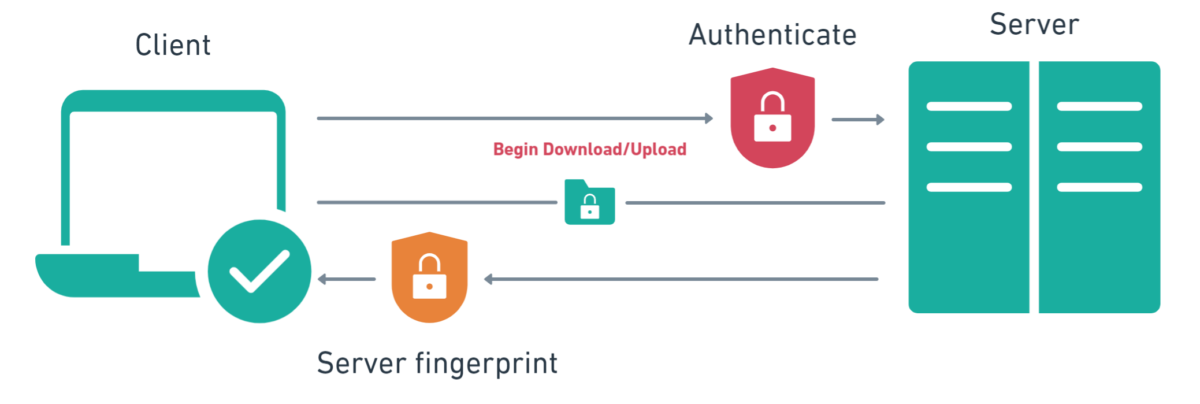
Almost any company, has its own “File Server” which basically a computer that distributes files to known trusted customers or thirds party partners. As you can see in the image below, there is what you called SFTP client which will be used by customers to connect to the SFTP Server. When a request by the client is authenticated successfully by the server then a secured connection is established. With that being said, having an SFTP Client and SFTP Server eliminates the risk of sharing files insecurely.
Why Use Porta SFTP Server?
Given that you understand the basic concept of SFTP Client and SFTP Server now then you can see why Porta SFTP Server software is developed. The software name “Porta” means Portable, the software is so easy to use and you have full control of your credential information such as the username and password used for authentication. The question is if the software is free. The community edition is totally free which is driven by people’s support.
Features:
- File Log Writer – Logs about all the sessions
- Users Credentials & Key Authentications
- Unlimited Users & Data Directories
- Light SQLite Database Storage
- Full Data Encryptions
- Azure & AWS VM Friendly
- Easy to migrate
File Log Writer – Logs about all the sessions
The file logs writer is very important as it captures all the sessions of the connected clients to your server. Porta SFTP Server has this functionality as you can use this to see all the sessions of clients. It tracks all the IP addresses & usernames being used to connect to your server which is a good thing to have. With that being said, if you want to review the logs of all the sessions then you might consider this as a great feature.
Users Credentials & Key Authentications
To connect to the SFTP Server, the end-user should have a username & password or keys to be used for authentications. Porta SFTP Server makes the user’s credential management very easy as well as creating public & private keys. The username and password or user keys will be used to authenticate users’ sessions from any SFTP client to connect to the server.
Unlimited Users & Data Directories
Sometimes in a business, you may want to share the files with different clients. Therefore multiple usernames and passwords are needed. With Porta SFTP Server you can manage multiple users and data directories. The latter is due to the fact that you do not want all your clients or partners to have the same login credentials.
Light SQLite Database Storage
One of the big advantages of the Porta SFTP Server is that the software does not store passwords in plain text or in registries. Porta SFTP Server has its own super light & fast, and portable database (Embedded) called “SQLite”. The latter also proves that we do not have control over the application installed into your computer besides yourself.
Full Data Storage Encryptions
Encryption for data communications and storage is very important, this is to prevent anyone from just having access to the software, data, and database storage. Porta SFTP Server has the functionalities to ensure that data communication between the interactive user interface and the user is secured. The software also uses Advanced Encryption Standard (AES) to encrypt the whole database.
Parallel Session & Connection Support
Porta SFTP Server supports concurrency connections and sessions from any authenticated users. This means, if you allow to, the file server can easily distribute the files in a multi-threaded mode that handles any requested events by authenticated users.
Azure VM Friendly
One of the most exciting about the Porta SFTP Server is that we tested well in Azure Virtual Machine and tried to establish communication from our local computer and transfer over 40+gb in size compressed files. The configuration is pretty easy as you only need to install the software and open ssh port 22.
Easy to migrate
Porta SFTP Server configuration will depend on its storage database and configuration file, there are no key/value settings stored in the computer’s registry. With that being said, when you want to transfer it to a different computer all you need to do is to copy its files, and you are done…
Consider Becoming A Sponsor – Free Edition
While the software is totally free, we will really appreciate it if you donate. If you are a company, we will mention you in our page listing, social media and etc… We also have program sponsors to which if an individual or entity gave a certain amount of money beyond or at least $500 will be in our software sponsor splash form, sponsor page, and social media. This is good for your company as it shows interest to help others as 50% of the amount of donation or money given from sponsors will be donated to people who are in need.
Note that where we donate the money might mention the sponsors within their own school group or page which is a good thing.